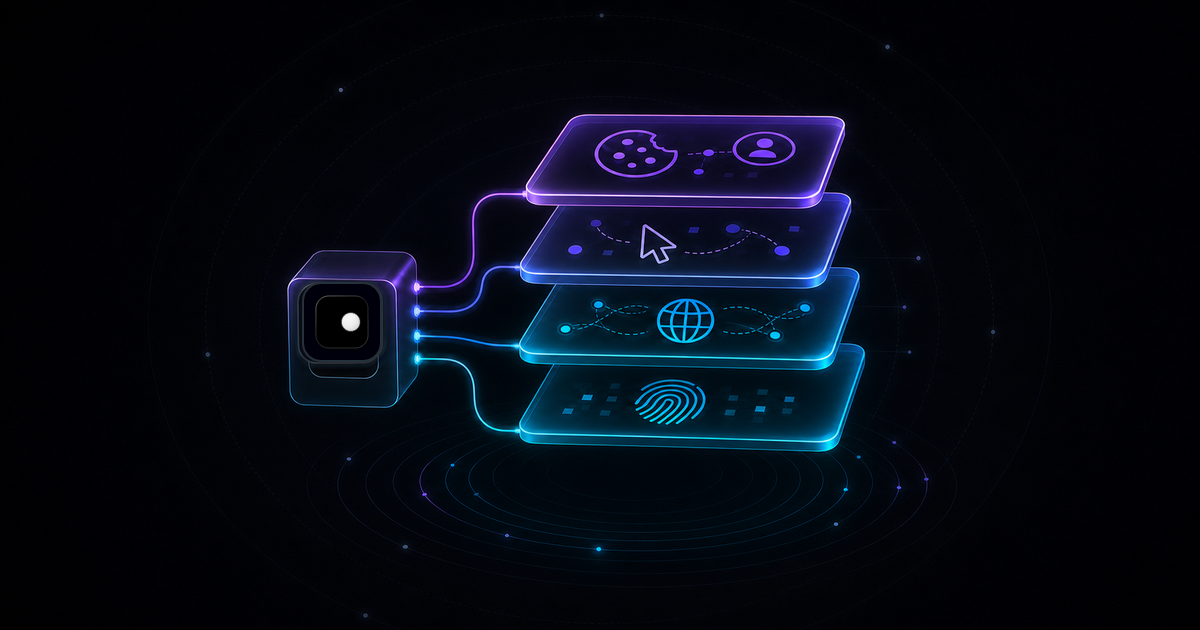
Your automation script works on your machine. You deploy it, and within hours it hits 403s, CAPTCHAs or silent blocks where every page returns the same empty shell. The code is identical. The target site hasn't changed. What changed is the environment your browser runs in, and anti-bot systems read that environment across four distinct layers.
TL;DR: Browser automation gets blocked because anti-bot systems check four layers: browser identity (fingerprints), network signals (IP and TLS), behavioral patterns (mouse and timing) and session management (cookies and state). Fixing only one layer leaves the other three exposed. The structural fix is bottom-up: start with a browser that has coherent fingerprints and proxy routing at the engine level, then handle behavior and sessions in your code.
Why automation gets blocked
Anti-bot systems like Cloudflare, Akamai, PerimeterX and DataDome don't rely on a single check. They score your session across multiple signals simultaneously. A clean IP with a leaking navigator.webdriver flag still gets blocked. A perfect fingerprint from a datacenter IP still gets blocked. The detection is layered, so the defense has to be layered too.
The four layers, from most fundamental to most situational:
| Layer | What it checks | Fix location |
|---|---|---|
| 1. Browser identity | Fingerprints, automation flags, engine signals | Browser binary |
| 2. Network | IP reputation, TLS fingerprint, DNS, WebRTC | Proxy configuration |
| 3. Behavior | Mouse movement, timing, scroll patterns | Application code |
| 4. Session | Cookies, login state, request frequency | Application code |
Layers 1 and 2 are infrastructure problems. Layers 3 and 4 are code problems. Most developers start at layer 3 (adding random delays) while layers 1 and 2 are wide open. That's why the fix never sticks.
Layer 1: Browser identity
This is where most automation fails and where most developers don't look.
A stock Chromium instance controlled by Playwright or Puppeteer leaks automation signals from 20+ surfaces: navigator.webdriver is set to true, the chrome.runtime object is missing, WebGL renderer strings expose headless GPU drivers, Canvas readbacks produce deterministic hashes and AudioContext outputs don't match real hardware. Anti-bot scripts collect all of these in the first 200ms of page load, before your code even runs.
What doesn't work
Stealth plugins like puppeteer-extra-plugin-stealth or playwright-stealth patch some signals at the page level. They override navigator.webdriver with JavaScript. The problem: anti-bot systems read signals from the browser engine itself, not just the page. A JavaScript override of navigator.webdriver is detectable because the property descriptor differs from a real browser. Canvas and WebGL readbacks come from the GPU pipeline, not from JavaScript. Page-level patches can't reach the engine.
Random User-Agent strings change one signal out of 20+. If your User-Agent says macOS but your WebGL renderer reports a Linux GPU driver, your fonts are Windows-only and your timezone offset doesn't match the locale, the incoherence is worse than not spoofing at all.
Headless mode (--headless) produces a completely different fingerprint than headed Chrome. Screen dimensions, GPU rendering path, font rendering and plugin lists all differ. Some sites block headless outright.
What works
The fix is at the browser-binary level. An anti-detect browser patches fingerprint signals inside the Chromium engine so they are coherent across all 20+ surfaces: Canvas, WebGL, AudioContext, fonts, navigator properties, client rects, media devices, screen dimensions, timezone, language and WebRTC all report values that match a single real-world device profile.
Coherence is the key word. Spoofing individual signals creates contradictions. Managed fingerprints ensure every signal tells the same story.
For the full breakdown of all 20+ signals, see Browser Fingerprinting Explained: The 20+ Signals Anti-Bot Systems Use to Detect Automation.
Layer 2: Network
A clean browser identity from a flagged IP still gets blocked. Anti-bot systems check the network layer independently.
IP reputation
Datacenter IPs (AWS, GCP, Azure, DigitalOcean) are catalogued. Anti-bot providers maintain databases of IP ranges associated with cloud infrastructure. Requests from these ranges get higher scrutiny or outright blocks regardless of browser fingerprint.
Residential IPs from real ISPs have far lower block rates. The difference is measurable: the same automation script with the same browser identity can go from a 90% block rate on a datacenter IP to under 5% on a residential proxy.
TLS fingerprint
Every HTTPS connection starts with a TLS handshake. The order of cipher suites, extensions and supported curves in the ClientHello message creates a TLS fingerprint (JA3/JA4). Stock Chromium, headless Chrome and Playwright each produce different JA3 hashes. If the TLS fingerprint says "automation tool" while the User-Agent says "Chrome 126 on macOS," the session gets flagged.
The fix: use a browser binary that produces a real Chrome TLS fingerprint. Page-level proxies and HTTP libraries can't fix TLS fingerprinting because the handshake happens before any JavaScript runs.
Geographic alignment
If your browser fingerprint reports a US English locale with US timezone but the IP geolocates to a datacenter in Frankfurt, anti-bot systems flag the mismatch. Proxy routing needs to align geography: the IP location should match the fingerprint's timezone, language and locale.
WebRTC leaks
WebRTC can expose your real IP address even when routing through a proxy. STUN requests bypass HTTP proxy configuration and connect directly, revealing the origin IP. This must be handled at the browser level, not in application code.
Layer 3: Behavioral patterns
With layers 1 and 2 handled at the infrastructure level, layer 3 is where your application code matters.
Anti-bot systems track how the session interacts with the page. Real users don't navigate like scripts: they don't click elements within 5ms of page load, they don't scroll at a constant 500px/s, and they don't visit 200 pages in 60 seconds with zero idle time between them. If you want to see these behavioral patterns assembled into a working agent from scratch, How to Build an AI Agent That Browses the Web (Python + CDP) is the step-by-step tutorial.
What to implement
Randomized delays between actions. Not a fixed sleep(2000) — a randomized range that varies per action type.
import random
import asyncio

async def human_delay(min_ms=800, max_ms=2500):
delay = random.uniform(min_ms, max_ms) / 1000Realistic mouse movement. Move the cursor to the element before clicking rather than teleporting. Some anti-bot systems track mouse event sequences and flag clicks with no preceding mousemove events.
async def move_and_click(page, selector):
    element = await page.query_selector(selector)
    box = await element.bounding_box()
    # Move to element with some randomness in the endpoint
x = box["x"] + box["width"] * random.uniform(0.3, 0.7)Scroll behavior. Scroll incrementally, not to the exact element position. Real users scroll past their target and back.
Request pacing. If you're hitting the same domain, space requests so your session doesn't look like a crawler. 2-5 seconds between page navigations is a reasonable baseline for most sites.
Layer 4: Session management
The final layer is state. Anti-bot systems track sessions over time and flag patterns that no real user produces.
Cookie persistence
Real browsers accumulate cookies over multiple visits. A session that arrives with zero cookies, accepts all of them, then shows up again five minutes later with zero cookies again is obviously automated. Persist cookie state between runs using isolated browser profiles.
Login state
If your automation logs into an account, maintain that session. Logging in, performing one action and logging out repeatedly from different fingerprints flags the account.
Session isolation
When running multiple concurrent sessions (scraping different sections, managing multiple accounts), each session needs its own isolated context: separate cookies, separate local storage, separate fingerprint. Cross-contamination between sessions — where cookies from session A leak into session B — is a common cause of blocks in concurrent automation.
from playwright.async_api import async_playwright

async def isolated_session(profile_name, target_url):
    async with async_playwright() as p:
# Connect to Clawbrowser with an isolated profileRate limiting yourself
Monitor your request patterns against a single target. If you're making 1,000 requests per hour to the same domain, no amount of fingerprint management will help. Set reasonable limits per domain and rotate sessions when approaching thresholds. This can be achieved by spreading the request load between multiple accounts, each with a separate browser profile and proxy.
Putting it together
Layers 1 and 2 are infrastructure. You shouldn't be solving them in application code. An anti-detect browser with managed fingerprints and built-in proxy routing handles both layers at the engine level, so your code only deals with layers 3 and 4.
Clawbrowser is a Chromium fork that handles these infrastructure layers: engine-level fingerprint patches across 20+ surfaces, built-in proxy routing with geographic alignment, WebRTC leak prevention and native CDP support. Your Playwright or Puppeteer code connects to it like any other Chrome instance.
from playwright.async_api import async_playwright
import random, asyncio

async def scrape_with_clawbrowser():
async with async_playwright() as p:Get started by copying the install prompt from clawbrowser.ai and pasting it into your AI agent — setup takes under two minutes with no terminal walkthrough required.
The layers are independent. If you're getting blocked, diagnose which layer is the cause. If you've already confirmed your fingerprints are clean and your IP isn't flagged, the problem is in your behavioral code or session management. If your behavior is realistic but you're still blocked, the problem is in your browser identity or network layer. Work bottom-up.
For a step-by-step diagnostic when CAPTCHAs appear, see Why Your Automation Keeps Triggering CAPTCHA: The 7-Signal Diagnostic Guide.
What doesn't work (and why)
| Approach | Why it fails |
|---|---|
--headless flag |
Produces a different fingerprint than headed Chrome. Many sites block headless outright. |
| Stealth plugins | Patch signals at the page level. Engine-level signals remain exposed. Detectable within months of each release. |
| Random User-Agent rotation | Changes 1 signal out of 20+. Creates incoherence with other fingerprint signals. |
| Rotating only IPs | Fixes layer 2 but leaves layer 1 wide open. A clean IP with a leaking browser identity still gets blocked. |
Adding sleep(5) everywhere |
Fixes one aspect of layer 3. Doesn't address layers 1, 2 or the rest of layer 3. |
The common thread: each approach fixes one signal in one layer. Anti-bot systems check all four layers simultaneously. Partial fixes don't survive in production.
FAQ
Can Cloudflare detect Playwright?
Yes. Stock Playwright running on standard Chromium is detectable by Cloudflare's Turnstile and Bot Management within seconds. The detection is primarily at layer 1 (browser identity): navigator.webdriver, CDP artifacts, WebGL rendering differences and TLS fingerprinting. For a detailed breakdown, see Why Your Playwright Scripts Keep Getting Blocked by Cloudflare.
Do I need residential proxies?
For sites with aggressive anti-bot systems, yes. Datacenter IPs are catalogued by anti-bot providers and receive higher scrutiny. Residential proxies from real ISPs significantly reduce block rates. However, a residential IP with a leaking browser fingerprint will still get blocked. Proxies fix layer 2, not layer 1.
Is headless mode always detected?
Modern headless Chrome (--headless=new) is closer to headed mode than the old headless implementation, but differences remain in GPU rendering, screen metrics and font availability. Sites with sophisticated detection (Cloudflare, Akamai, DataDome) can still distinguish headless sessions. For high-value targets, headed mode with a proper anti-detect browser is the reliable choice.
How fast can I scrape without getting blocked?
There's no universal number. It depends on the target site's rate limits and detection sensitivity. A reasonable starting point: 2-5 seconds between page navigations on the same domain, randomized within that range. Monitor your block rate and back off if it increases. Some sites tolerate 1 request per second. Others flag anything above 1 request per 10 seconds from a single session.
Does browser automation for AI agents have the same detection issues?
Yes. AI agent frameworks like Claude Code, Codex, Cursor and Hermes Agent control browsers through CDP. The browser identity is what anti-bot systems check, not whether the commands come from a human or an agent. An AI agent connecting to a standard Chrome instance gets blocked for the same reasons a Playwright script does. See CDP Browser for AI Agents: A Developer Guide for the agent-specific setup.
Start from the bottom
Browser automation gets blocked because anti-bot systems check four layers and most automation only addresses one or two. Fix from the bottom up: browser identity first, then network, then behavior, then sessions. The first two layers are infrastructure problems that belong in the browser, not in your code.
Install Clawbrowser to handle layers 1 and 2 — copy the install prompt from clawbrowser.ai and paste it into your AI agent. Then focus your code on layers 3 and 4: realistic timing, mouse movement, session isolation and rate management. That's the stack that holds up in production.
Continue exploring
Ask AI how Clawbrowser helps
Keep reading
Related articles
Puppeteer-Extra-Stealth Is Obsolete: What Modern Automation Uses Instead
puppeteer-extra-plugin-stealth hasn't been updated since 2023. Here's why it fails on modern anti-bot systems and what to use instead.
Read article →
Web Scraping Without Getting Detected: Techniques That Always Work
Practical web scraping guide: site reconnaissance, choosing HTTP vs browser, data extraction patterns, pagination, session management and scaling.
Read article →